

Let’s be real—most note-taking apps feel like relics. Either they’re a visual train wreck, bloated with features, or just painfully bland. SmartNoteX breaks that mold. It’s light, clean, and genuinely fun to use, while still packing in security and thoughtful design that you’ll actually appreciate in your day-to-day.
1. A Notepad That Feels Modern
Here’s the thing: SmartNoteX doesn’t look like your grandpa’s app. It embraces edge-to-edge layouts, purposeful spacing, and buttons that almost whisper, “tap me.” Minimalist, yes—but intentional.
2. Security That Doesn’t Get in the Way
Locking down your private notes shouldn’t feel like a full-time job. SmartNoteX strikes the right balance:
- 4-digit PIN, when you want privacy.
- Guest Mode, so you can try it without commitment, and upgrade anytime.
- Local storage first—no sneaky uploads unless you choose to back up.
- Easy Backup & Restore when switching devices.
3. Notes That Go Beyond Plain Text
Words on a page are fine—but SmartNoteX gives you more:
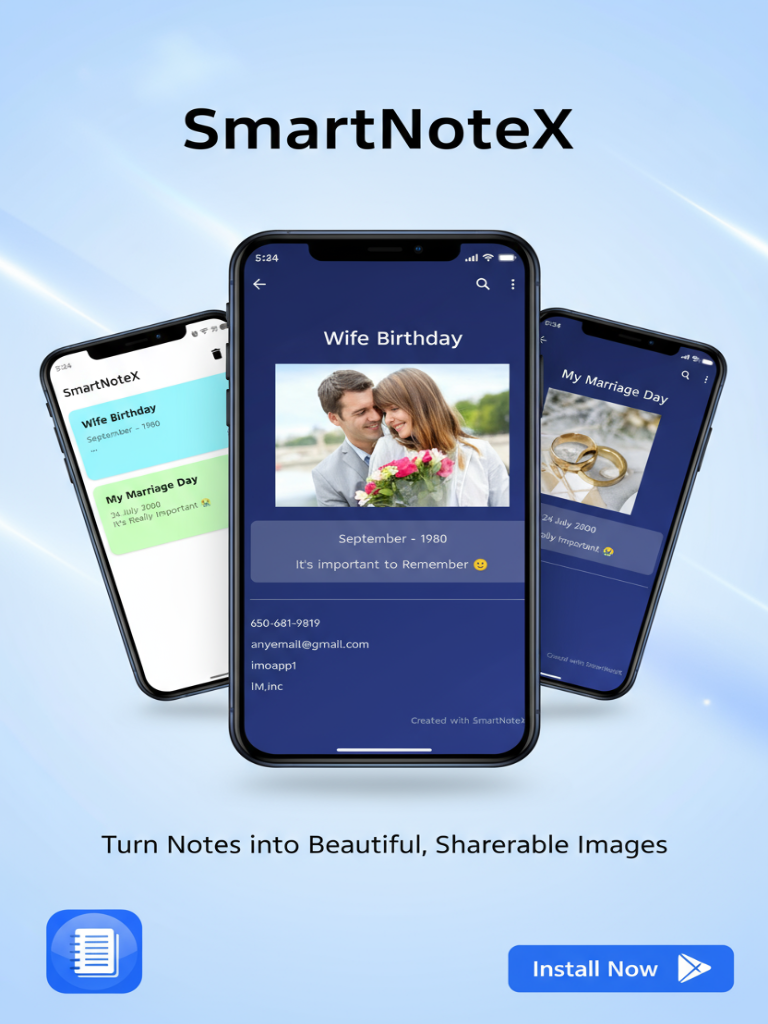
- I-Cards: visually styled note cards with bold titles and eye-catching fonts.
- Fonts that fit the mood, from serious sans-serif to playful handwriting.
- Image attachments—snap your whiteboard, receipts, or ideas.
It’s like having a notebook that still feels human.
4. Smooth, Fast, and Polished
No lag. No jerkiness. Just flow. Open a note > edit it > save it. Animations keep things visually consistent, buttons respond crisply, shadows feel natural—everything just works.
5. Everyday Use Cases
SmartNoteX doesn’t pigeonhole you. People use it for:
- Lecture notes and subject organization
- Meeting minutes and project tracking
- Gaming plans, quest strategies, or Discord research
- Story outlines, quotes, or visual brainstorms
- Shopping lists, bills, or gratitude journals
It morphs into whatever you need—simple, flexible, effective.
6. Built-in Reminders
Here’s where the app steps up: you can attach reminders to your notes.
- “Pay rent” pops up on the due date.
- “Buy groceries” nudges before grocery runs.
- Creative ideas ping you at your focused writing time.
Notes don’t just sit there—they get stuff done.
7. Trash and Recovery
We’ve all deleted something important by mistake. SmartNoteX handles this with a trash bin—you can restore or permanently delete later. Lifesaver.
8. Settings That Make Sense
Settings aren’t a maze:
- You can set or change your PIN.
- There’s a built-in user guide—clear, fullscreen, helpful.
- You can log out if you’re not using Guest Mode.
Minimal. Logical. Exactly what you need. WGC- We Gamers Club
9. Attention to Detail
The kind of details people miss but remember:
- Time-based greetings like “Good Morning” on your dashboard.
- Sleek digital time pickers instead of clunky analog wheels.
- Styled note backgrounds and bold titles.
- Smooth animation transitions.
They’re small touches, but they lift the whole experience.
10. Why It Hits with Gamers and Creators
SmartNoteX landed on WeGamersClub for a reason. It lines up perfectly with how gamers and creators think:
- Jot down raid strategies, quest plans, build orders.
- Streamers can draft talking points, sponsorship notes.
- Creators storyboard ideas, capture thumbnails, outline writing.
Lightweight enough for casual use. Flexible enough for serious planning.
11. Frequently Asked Questions
Let’s clear up what matters:
- Is SmartNoteX free? Yup. No cost to use the core features. Future updates might add premium themes or sync options.
- Does it need the internet? Nope. Works fully offline. You only go online for backups.
- Switching from Guest to PIN later? Totally. Just head into Settings.
- Forgot your PIN? Don’t sweat it—there’s a “Forgot Password” option in Settings.
- Tablets? Yep, it scales beautifully with edge-to-edge layouts.
12. Final Thoughts: A Notepad That Finally Makes Sense
SmartNoteX doesn’t try to be a Swiss Army knife. It’s not overloaded. It’s not bland. It’s just a smart, secure, visual notepad that gets out of your way and lets you capture ideas fluidly. If you’ve tried Evernote, Google Keep, or OneNote and felt something was missing—this might be the balance you’ve been waiting for.